Chicken or Egg?
Do you "have" a listing or "want" to find one? If you have a listing then you'll want to start by adding it. If you are "looking for" something particular for your client then you'll want to start by creating a Saved Search.
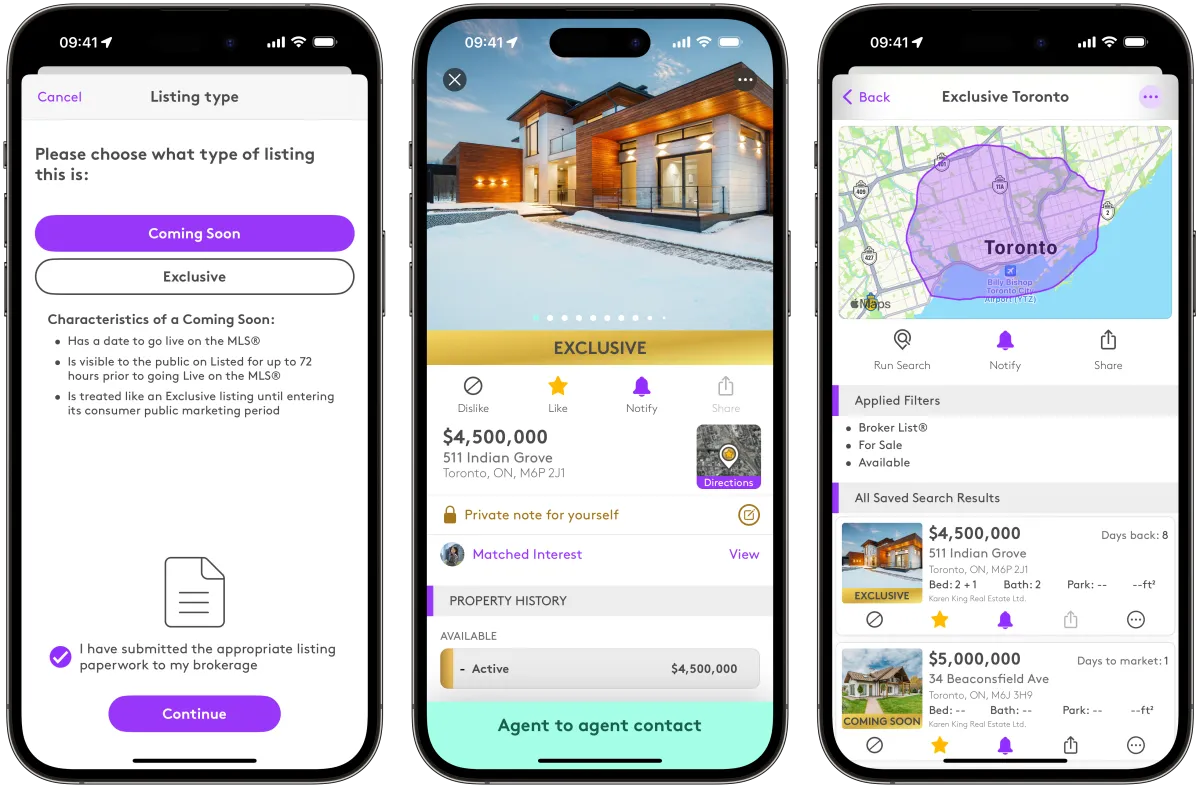
The image on the left shows the uploading of a "Coming Soon" listing. The centre image is a recently uploaded "Exclusive" listing. The image on the right shows Broker List® (Exclusive and Coming Soon) matches for a Saved Search. Please note: the results will only show if the listing is a) from the agent's brokerage or b) was shared with the agent in a direct, one-to-one communication on Listed. Agents who do not have access will not see any listings.
Demand is expressed by creating a Saved Search
Create a Saved Search
To receive off-market listings from agents from outside an agent's brokerage, create a Saved Search. Listing agents are notified of existing demand and can search for agents to send their listing to. Listing agents simply tap 'Send' from the 'Send listing to an agent' section on their listing. This sends a direct, one-to-one communication to the co-operating agent and keeps a record in the Listing agents 'Sent' Broker List® listings section. A record is also kept for the Co-operating agent in their 'Received Broker List® listings section.
Supply is expressed by uploading an Exclusive or Coming Soon listing
2) Upload a listing
To share off-market listings to agents from any brokerage agents need to first upload their listings to Listed.

©2026 Listed
Your Network Working®